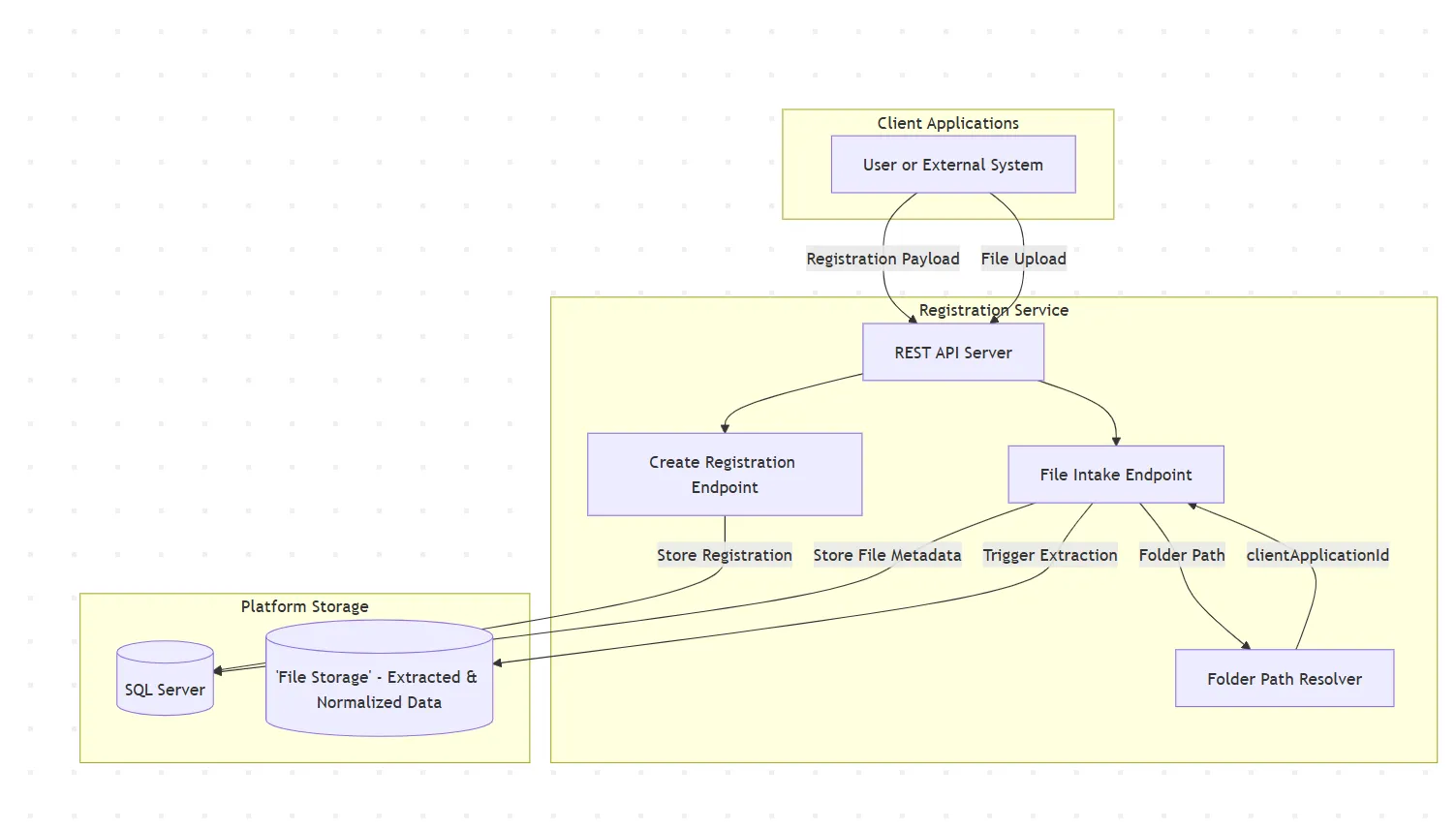
Registration Service
This document provides a detailed explanation of the components and interactions in the Registration Service architecture. It is intended to help stakeholders understand the responsibilities of each part of the system, how they connect, and why they exist.
---
Overview
The Fluxx Registration Service is the central directory service for managing client-application configurations in the platform. It enables:
-
Client & Application Onboarding: Secure registration of clients, applications, and their configurations
-
Feature-Driven Configuration: Support for pluggable features like file intake, extraction, classification, and document splitting
-
Delivery Routing: Configuration of delivery destinations for extracted/processed data
-
Lookup & Ownership Tracking: Query endpoints that answer “who owns these files?” and “where should delivery go?”
-
Audit & Event Publishing: Change tracking and event propagation via Service Bus
The service uses a feature-based architecture where each registration can enable multiple features with distinct configurations. Each entity receives randomized, opaque IDs to ensure tenant isolation and prevent cross-tenant access.
---
Core Components
1. Client Applications (External Systems)
-
Function: External systems or users that interact with the Registration Service.
-
Purpose: Submit registration requests and manage configurations.
-
Connections:
- Send HTTP requests to the REST API Server with authentication tokens.
- Can use either V1 (granular) or V2 (consolidated) endpoints.
---
2. REST API Server (Fastify-Based)
-
Function: Central entry point for all client requests.
-
Purpose: Routes incoming HTTP requests, enforces authentication/authorization, and validates payloads.
-
Framework: Built on Fastify with integrated middleware for CORS, error handling, and swagger documentation.
-
Connections:
- Receives authenticated HTTP requests from Client Applications.
- Routes to appropriate controllers based on API version and endpoint.
- Enforces role-based access control (RBAC) and scopes.
---
3. Controllers (Business Logic Layer)
Primary controllers include:
-
ClientController: Handles client registration and retrieval
-
ClientApplicationController: Manages client-application registration, updates, and retrieval (handles both V1 and V2 requests)
-
ClientApplicationExtractorController: Manages extractor configurations
-
ClientApplicationClassifierController: Manages classifier configurations
-
ClientApplicationAllowedExtensionController: Manages allowed file extensions
Function: Execute business logic for registration, updates, deletions, and queries.
Purpose: Orchestrate interactions between repositories, Service Bus messaging, and data validation.
Connections:
- Call repositories to persist/retrieve data.
- Publish registration events to Service Bus after changes.
- Validate input according to business rules.
---
4. Repositories (Data Access Layer)
Repositories handle all database interactions:
-
ClientRepository: Client entity persistence
-
ApplicationRepository: Application entity persistence
-
ClientApplicationRepository: Client-application relationship persistence
-
ClientApplicationExtractorRepository: Extractor configuration persistence
-
ClientApplicationClassifierRepository: Classifier configuration persistence
-
ClientApplicationAllowedExtensionRepository: Allowed file extension persistence
-
ClientApplicationFeatureRepository: Feature flag persistence
Function: Abstract database queries and provide CRUD operations for entities.
Purpose: Provide a clean data access interface and handle upsert logic.
Connections:
- Execute SQL queries against the SQL Server database.
---
5. SQL Server Database
-
Function: Primary persistent data store for all registration data.
-
Purpose: Store structured data for client, application, feature, extractor, classifier, and allowed extension configurations.
-
Schema:
registrationschema contains all domain tables (see ERD diagram below). -
Connections:
- Receives queries from repositories.
- Stores and retrieves registration entities, features, and configurations.
---
6. Azure Service Bus
-
Function: Asynchronous messaging system for publishing registration change events.
-
Purpose: Propagate registration changes (create, update, delete) to downstream services for event-driven architectures.
-
Events Published:
- ClientRegistrationEvent: Client creation events
- ClientApplicationRegistrationEvent: Client-application creation, update, or deletion events
- Connections:
- Receives messages from controllers after successful database changes.
- External services subscribe to relevant topics for integration.
---
7. Authentication Provider
-
Function: Validates incoming authentication tokens.
-
Purpose: Enforce secure access control and identity verification.
-
Connections:
- Integrated into Fastify middleware for request preprocessing.
---
API Endpoints Overview
V1 API (Granular Endpoints)
The V1 API provides separate endpoints for each entity type:
| Endpoint | Method | Purpose |
|----------|--------|---------|
| /v1/client | POST | Register a new client |
| /v1/client/:clientId | GET | Retrieve client by ID |
| /v1/client/:clientId | PATCH | Update client |
| /v1/client/:clientId | DELETE | Deactivate client |
| /v1/clientApplication | POST | Register client-application |
| /v1/clientApplication | GET | List client-applications |
| /v1/clientApplication/:clientApplicationId | GET | Get specific client-application |
| /v1/clientApplication/:clientApplicationId | PATCH | Update client-application |
| /v1/clientApplication/:clientApplicationId | DELETE | Deactivate client-application |
| /v1/clientApplication/:clientApplicationId/extensions | GET | Get allowed file extensions |
| /v1/clientApplication/:clientApplicationId/extensions | POST | Set allowed file extensions |
| /v1/clientApplication/:clientApplicationId/extractor | GET | Get extractors |
| /v1/clientApplication/:clientApplicationId/extractor | POST | Set extractors |
| /v1/clientApplication/:clientApplicationId/classifier | GET | Get classifiers |
| /v1/clientApplication/:clientApplicationId/classifier | POST | Set classifiers |
V2 API (Consolidated Registration)
V2 consolidates client, application, and all feature configurations into unified endpoints:
| Endpoint | Method | Purpose |
|----------|--------|---------|
| /v2/registrations | POST | Create full registration (client, app, all features) |
| /v2/registrations/:clientApplicationId | GET | Retrieve full registration view |
| /v2/registrations/:clientApplicationId | PATCH | Update registration (partial updates) |
| /v2/registrations/:clientApplicationId | DELETE | Deactivate registration |
| /v2/registrations/search | POST | Paged search for registrations |
Advantage: V2 reduces onboarding from 4+ HTTP calls to a single call, simplifying client integration.
---
Feature-Based Configuration Model
Registrations support multiple features, each with specific configuration:
1. fileIntake Feature
Enables delivery of extracted/processed files to a customer endpoint.
2. extractor Feature
Configures document extraction pipelines.
3. classifier Feature
Configures document classification services.
4. splitter Feature
Configures document splitting/segmentation services.
---
Data Flow Summary
Registration Creation (V2 Endpoint)
-
Client Application sends a registration request to
POST /v2/registrationswith client name, application name, and feature configurations. -
REST API Server authenticates the request and routes to ClientApplicationController.
-
ClientApplicationController validates the payload and orchestrates:
- Creates/retrieves the Client entity via ClientRepository
- Creates/retrieves the Application entity via ApplicationRepository
- Creates the ClientApplication junction entity with opaque IDs
- Creates associated Feature records via ClientApplicationFeatureRepository
- Creates Extractor, Classifier, and AllowedExtension records as needed
-
SQL Server persists all entities in the
registrationschema. -
ClientApplicationController publishes a ClientApplicationRegistrationEvent to Azure Service Bus.
-
A consolidated response is returned to the client with all created entities and IDs.
Registration Retrieval (V2 Endpoint)
-
Client Application sends
GET /v2/registrations/:clientApplicationId. -
ClientApplicationController retrieves the registration view via repository queries.
-
SQL Server returns the client, application, and all associated features/configurations.
-
A comprehensive response containing all registration details is returned.
Registration Update (V2 PATCH)
-
Client Application sends
PATCH /v2/registrations/:clientApplicationIdwith updates. -
ClientApplicationController applies partial updates:
- Delivery settings can be updated
- Feature lists are treated as full replacements when supplied
-
SQL Server persists the updated data.
-
A ClientApplicationRegistrationEvent is published to Service Bus.
-
Updated registration is returned.
---
Authentication & Authorization
All endpoints require:
-
Authentication: Valid Azure AD token passed in
Authorization: Bearer <token>header -
Authorization: Role-based access control (RBAC) with scopes:
- Roles: FLUXX_ADMIN, FLUXX_APPLICATION, FLUXX_USER
- Scopes:
- FLUXX_REGISTRATION_CLIENT_READ
- FLUXX_REGISTRATION_CLIENT_WRITE
- FLUXX_REGISTRATION_CLIENTAPPLICATION_READ
- FLUXX_REGISTRATION_CLIENTAPPLICATION_WRITE
---
Error Handling
The service returns structured problem responses (RFC 7807 Problem Details format):
Common status codes:
-
201 Created: Successful registration creation -
200 OK: Successful retrieval or update -
204 No Content: Successful deletion -
400 Bad Request: Validation or business logic error -
404 Not Found: Resource not found -
409 Conflict: Duplicate registration (e.g., client-application pair already exists) -
500 Internal Server Error: Unexpected server error
---
Configuration & Deployment
Environment Variables (via Azure App Config)
-
FLUXX_REGISTRATION_AZURE_SERVICE_BUS_CONNECTION_STRING_OR_NAMESPACE: Service Bus connection -
FLUXX_REGISTRATION_SQL_SERVER: SQL Server hostname -
FLUXX_REGISTRATION_SQL_DATABASE: Database name -
FLUXX_REGISTRATION_SQL_IS_MANAGED_IDENTITY_USED: Use MSI for SQL auth (recommended) -
FLUXX_REGISTRATION_TOPIC_UPDATED_REGISTRATION: Service Bus topic for events -
FLUXX_REGISTRATION_APPLICATION_PORT: Server listening port (default: 3000)
Technology Stack
-
Framework: Fastify (Node.js web framework)
-
Language: TypeScript with ES modules
-
Database: Microsoft SQL Server
-
Messaging: Azure Service Bus
-
Authentication: Azure AD
-
Dependency Injection: Awilix
-
Testing: Vitest
---
Data Entities
Client
Represents an organization or business entity.
Application
Represents a software application.
ClientApplication
Junction entity linking Client and Application with operational configuration.
ClientApplicationFeature
Stores feature flags and their configurations.
ClientApplicationExtractor
Stores extractor configurations.
ClientApplicationClassifier
Stores classifier configurations.
ClientApplicationAllowedExtension
Stores allowed file extensions.
AllowedFileExtension
Global list of supported file extensions.
---
Example API Calls
V2 Registration Creation
V2 Registration Retrieval
Response includes full registration view with all features and configurations.
---
Architecture Diagram
The diagram below illustrates the multi-layered architecture with controllers orchestrating repositories, service bus messaging, and database interactions.